|
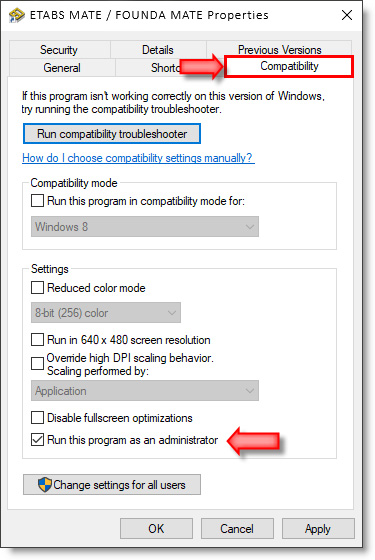
Please follow the steps below as shown
in the image:
1. First, close the software and make
sure it is not running
.
2. Right-click on the
ETABS MATE
or
FOUNDA MATE
icon on
the Desktop
or in your Windows program list.
3. Click on the
Properties
option from the menu that opens.
4.
In the
Properties
window that opens, select the
Compatibility
section.
5.
Enable the "Run
this program as an administrator"
option.
6. Click the
Ok
button and run the software again.
Note:
If the problem is not resolved after performing the above steps and the Software License ID still does not appear, please register the software and submit the activation request form using the following link:
etabsmate.ir/RegisterRC_en.htm
By using the registration link above, you will not need a Software License ID. Simply follow the instructions on the relevant page to complete the registration and submit the activation request form.
|